
Salesforce Field Service
Field Service implementation for UK teams
Salesforce Field Service was previously called Field Service Lightning, often shortened to FSL. The scheduling model is the same: work orders, service appointments, a dispatcher console and a mobile app for the person on site. SME Cloud Solutions Ltd sets that up for small and mid-sized organisations in the UK.
This page describes the product areas we configure. It does not report project statistics. A UK manufacturing customer has described their own Field Service project on our homepage.
Scheduling policies
Rules the scheduler has to follow
A scheduling policy is the rule set Salesforce uses when it proposes or books a visit. It is made of work rules and service objectives.
- Work rules are the limits: skills, service territory, operating hours, resource availability and travel.
- Service objectives are the preferences: minimise travel, book the earliest slot, or prefer a named resource.
- Emergency work and planned maintenance usually need different policies. The dispatcher picks the policy when scheduling.

Work orders
The job, the tasks and the visit
A work order is the job to be done. Work order line items split that job into tasks. A service appointment is the visit that goes on the schedule. One job can need more than one visit.
Statuses are configured for each org. A common path runs from new, to scheduled, to dispatched, to in progress, and then to completed or cannot complete. We map that path to the words your dispatchers and technicians already use, and we connect the work order to the Service Cloud case when the job starts from a support request.

Dispatcher console
Gantt, map and appointment list
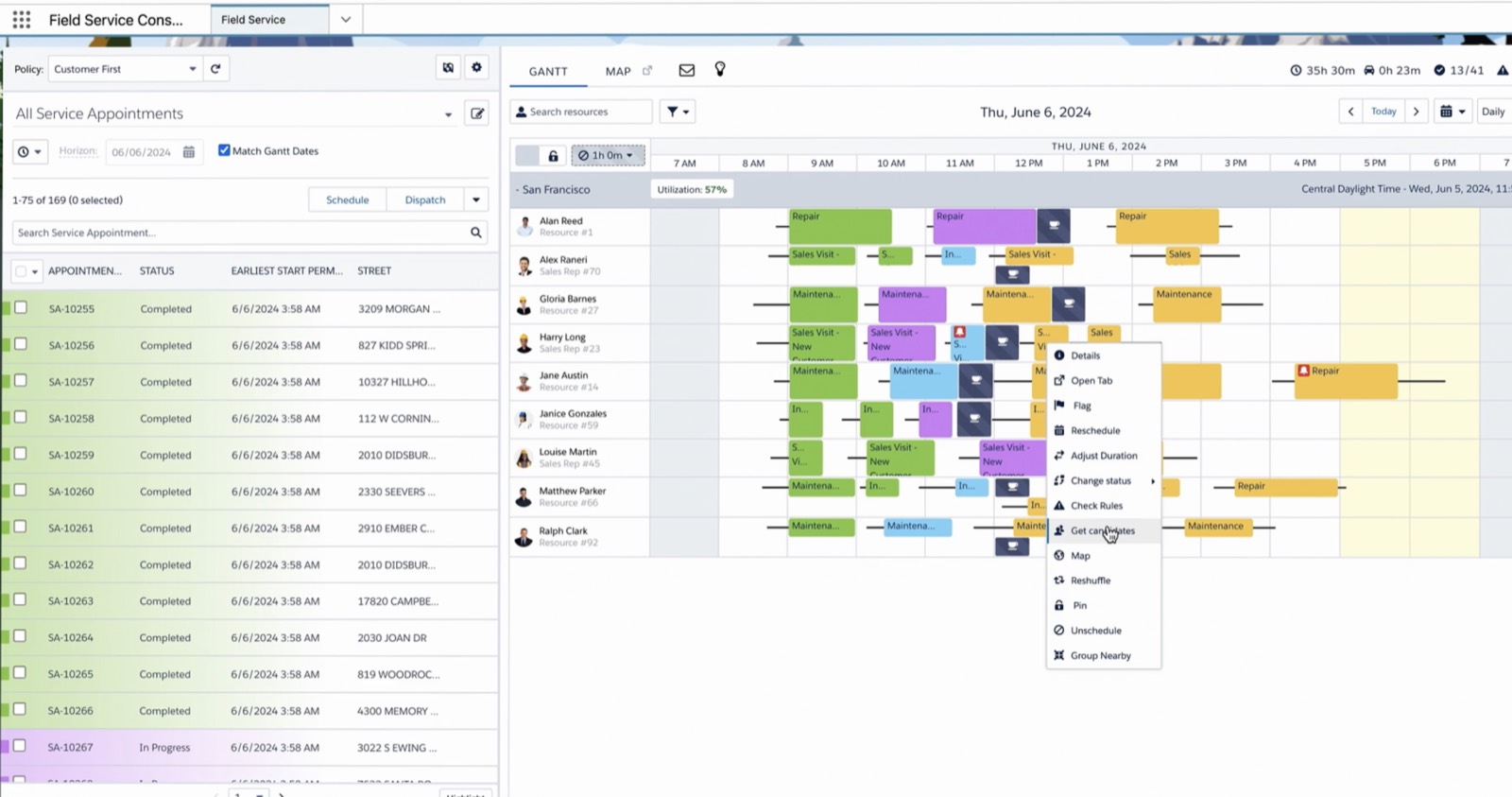
Dispatchers work in the Field Service console. The Gantt shows resources and appointments, the map shows where the work is, and the list holds the appointments still to place.
- Schedule and dispatch a visit, or ask the engine for candidates.
- Reschedule, flag, unschedule or check the rules when a job moves.
- See travel gaps and overlapping work before the technician is sent.
Mobile app
The visit, on the technician's phone
The Field Service mobile app is where the technician sees the assigned service appointment, the work order and the related records.
From the app they update status, add notes and photos, and record parts used. The app can be primed for places with poor signal, so the visit is not stuck when the connection drops. We set up the screens and the status changes the technician actually needs, rather than every object in the org.

Inventory management
Warehouses, vans and parts used
Field Service inventory tracks stock at a location. A location can be a warehouse or a van. Product items are the stock sitting in that location.
- Product requests ask for parts. Product transfers move them between locations.
- Products consumed are recorded on the work order when the part is fitted.
- Serialised stock is included when the org needs a record of the exact unit.

Integrations
The systems around the visit
Field Service rarely stands alone. The usual connections are the ones that create the job, supply the parts, or calculate the travel.
A Service Cloud case can create the work order. An ERP or stock system can supply product and availability. Maps provide travel for the scheduling policy. We design those connections for the org in front of us. This page does not claim a named integration is already live for a particular customer.

Implementation support
From the operating model to the first live week
We start with how the work is really dispatched: territories, skills, work types, operating hours and which jobs must be scheduled by a person.
- Configure service territories, resources, work types and scheduling policies.
- Set up the dispatcher console and the mobile app, then walk both teams through a real job.
- Stay on after go-live through managed services when you want someone to keep the org healthy.
